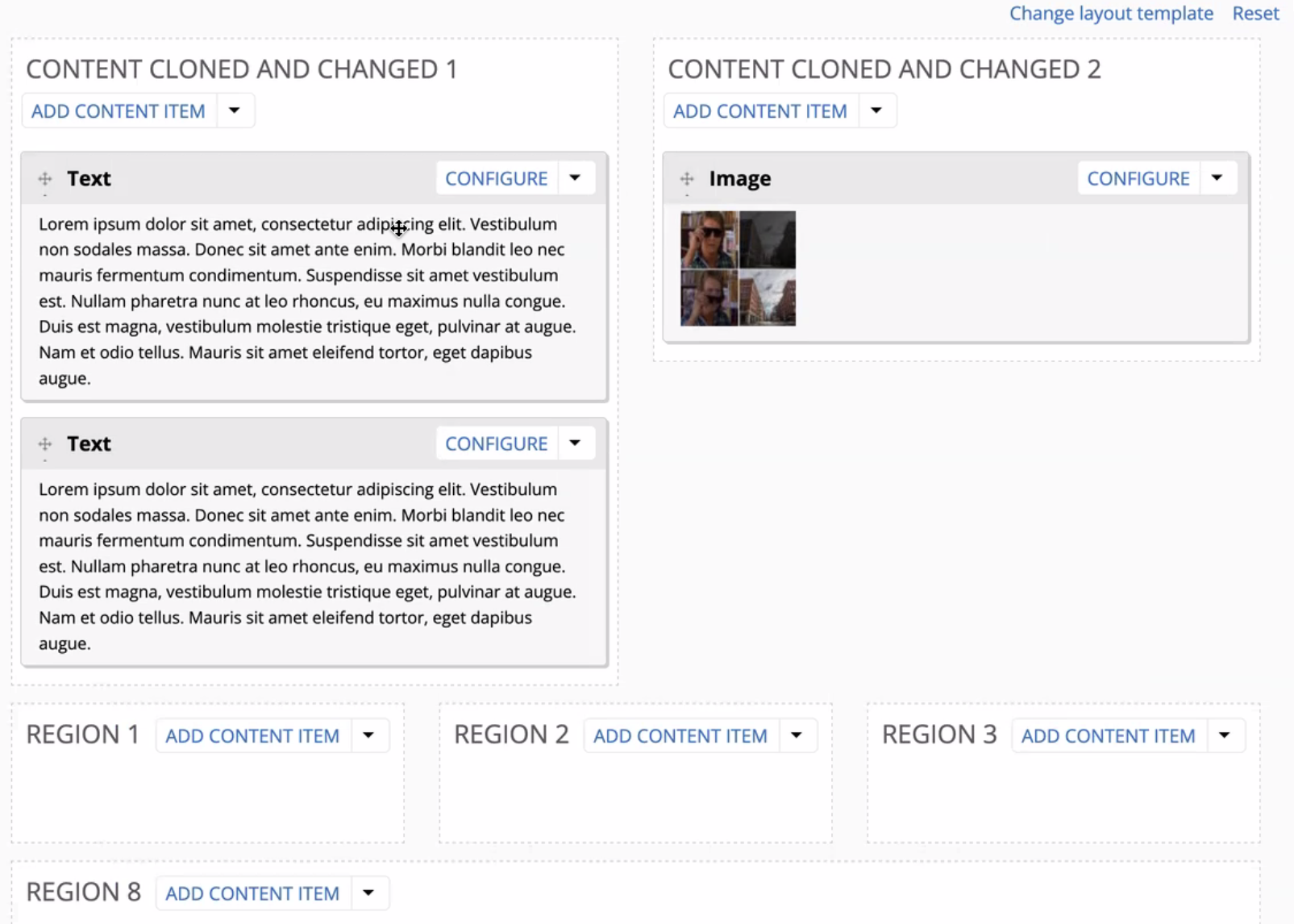
At a Backdrop User Group meeting on Dec 18, Laryn Kragt Bakker of Aten Design Group shared an early look at an important new project in development: Layout Paragraphs for Backdrop CMS. The project began as part of a conversation around what layouts could look like for content editors in Backdrop – taking into consideration the way that modern Drupal answered the question as well as functionality in a Drupal 7 installation profile called Web Express, developed originally at the University of Colorado Boulder and deployed currently in the College of Liberal Arts & Sciences at the University of Colorado Denver, which has provided backing for this project. This work is still in progress and not ready for use in production, but it represents a significant step toward giving site builders and content editors more flexible, controlled page-building tools — while staying true to Backdrop’s core principles.
This post summarizes the current state of the work, the design decisions behind it, and how the community can get involved.
Why Layout Paragraphs?
One of the most common questions from teams moving to or building on Backdrop is:
How can we give editors flexible page layouts without sacrificing structure, usability, or long-term maintainability?
In order to achieve this goal layout paragraphs is being built that allow
- Reuse Backdrop’s existing Layout system
- Avoid adding redundant UI patterns
- Preserve Backdrop’s emphasis on simplicity, stability, and compatibility
Core Idea: Extending the Layout API
At the heart of this work is a core issue to expand Backdrop’s Layout API so it can support different layout types. Today, layouts can come from code or from flexible layout templates created in the UI for some entities. This proposal extends that same mechanism so it can also power layouts inside the powerful Paragraphs module.
Rather than inventing a brand-new layout builder for Paragraphs, the idea is to use the exact same interface that site builders already know from core layouts.
This keeps the mental model consistent:
- Same layout template builder
- Same regions and columns UI
- Same configuration patterns
Paragraph-Specific Layout Templates
With the new Paragraphs 2.x work and the related core patch:
- Layout templates can now be created specifically for Paragraphs
- These templates are stored separately from core layout templates
- They do not clutter or confuse the main layout template listing
Out of the box, Paragraphs starts with a single default template (one region). This behaves much like the legacy Paragraphs interface—simple vertical ordering. For many sites, that may be enough.
For others, additional templates can be created with:
- Multiple regions
- Rows and columns
- Custom region widths
All using the familiar flexible layout UI.
Editing Experience for Content Editors
On content types that use a Paragraphs field with the Layout UI widget enabled, editors gain a much more visual editing experience where layout can be managed with the same ease as content:
- Paragraphs can be dragged and dropped between regions
- Paragraph configuration opens in a dialog instead of long inline forms
- Adding Paragraphs feels similar to adding blocks to a layout
- Paragraph types can be filtered by typing, which is especially helpful on sites with many components
Site builders can also:
- Limit which Paragraph types are available on a Paragraphs field
- Limit which layout templates are available on a Paragraphs field
- Lock a content type to a single layout template so editors don’t have to choose
This strikes a balance between editor flexibility and site governance.
Switching Layout Templates Safely
When multiple layout templates are allowed on a content type, editors (or site builders) can switch between them. To make this practical:
- Templates can be cloned, preserving region machine names, and then edited
- When region names match, existing Paragraphs stay in the correct regions when the template is switched
- This avoids the frustrating experience of all content collapsing into a single region when layouts change
This makes it possible to design families of related layouts that can be swapped with minimal disruption.
Deleting Templates Without Losing Content
If a layout template needs to be removed, the system behaves similarly to deleting image styles:
- If the template is in use, the user is prompted to select a replacement
- Paragraphs are reassigned intelligently to the new template’s regions
- Content remains intact and usable
There is still some cleanup work needed around cache clearing, but the core behavior is already in place.
Current Status and What’s Next
This is development-stage work, not production-ready functionality.
The key dependency is a core issue (Issue #6808) that expands the Layout API to support layout types. Before this can be merged:
- Basic automated tests need to be added
- The core change must be reviewed and approved
- Additional testing is needed to ensure nothing else in Backdrop core is affected
If this core work lands in the next Backdrop release, the plan is to:
- Publish a pre-release of Paragraphs 2.x
- Make it much easier for the community to test
- Invite broader feedback starting in January
How the Community Can Help
There are two main ways to contribute testing effort:
-
Test the core patch alone
- Verify that existing sites behave exactly as expected
- Ensure no unintended side effects in core layouts
-
Test the patch together with Paragraphs 2.x
- Explore layout templates for Paragraphs
- Provide feedback on UX, edge cases, and editor workflows
Even testing just the core patch is valuable.
Why This Matters
Layout Paragraphs for Backdrop is about more than convenience. It enables:
- Modern page-building workflows
- Better editor experience without full free-form chaos
- Reusable, structured design systems
- Stronger foundation for distributions like CampusDrop
It gives content editors just enough control—while allowing site builders to define clear boundaries.
This work is the result of close collaboration between community members and reflects Backdrop’s shared values: thoughtful architecture, reuse over reinvention, and steady progress.
More updates will follow as testing continues. Stay tuned—and if you can help test, your feedback will make a real difference.