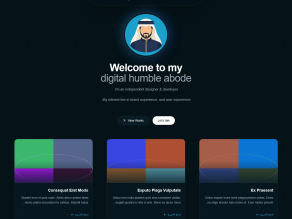
Portfolio is a modern, responsive portfolio theme for Backdrop CMS. It is designed for designers, developers, and other professionals who want to showcase their projects, articles, and personal information.

Features
- Responsive layouts styled with Tailwind CSS utility classes.
- Customizable appearance and social links through theme settings.
- Optional import of Projects and Articles taxonomy terms.
- Optional import of sample content, images, and navigation links.
- Views blocks for personal information, projects, and articles on the home page.
- Optional setup of the Home page layout with the three Views blocks.
- A taxonomy term listing View (
portfolio_taxonomy) with a dedicated field template for category pages. - No bundled third-party JavaScript libraries or external font dependencies.
Theme setup
The theme settings provide optional actions to:
- Import the Projects and Articles taxonomy terms.
- Import sample content and associated images.
- Import navigation links.
- Import Views blocks for the homepage.
- Configure homepage layout blocks.
The import/setup functions are located in includes/portfolio.setup.inc and are loaded by the theme settings file. Setup actions should be run in the order presented in the theme settings interface. Completed imports are tracked to help prevent duplicates.
Requirements
- Backdrop CMS 1.x.
- The Backdrop core modules required for taxonomy, fields, Views, menus, and layouts.
Installation
- Download or clone the repository into your Backdrop site's themes directory (
themes/portfolio), or install the theme through the Appearance interface. - Go to Administration > Appearance (
admin/appearance) and enable Portfolio. - Set Portfolio as the default theme.
- Open the Portfolio theme settings to customize appearance and social links.
- Optionally use the theme settings import options to add taxonomy terms, sample content, navigation links, and home page Views blocks, and to configure the Home layout. Run the options in the order shown in the settings form.
Note: The import and layout setup options are intended primarily for new or test sites. Review them carefully before using them on a site with existing content, menus, or customized layouts. Import functions are located in includes/portfolio.setup.inc.
Layout configuration
Home Layout
The optional Home layout setup places three Views blocks on the home page: personal information, projects, and articles. You can review and adjust their placement under Administration > Structure > Layouts (admin/structure/layouts), then edit the Home page layout (admin/structure/layouts/manage/home).
Default Layout
The Default layout controls the arrangement of blocks in pages that use it. To customize it:
- Go to Administration > Structure > Layouts (
admin/structure/layouts). - Edit the Default layout (
admin/structure/layouts/manage/default). - Add, remove, or reposition blocks in the available regions as needed.
- Save the layout changes.
The Home layout and Default layout are configured separately. Changing the Default layout does not automatically rearrange the three portfolio Views blocks on the Home page.
Portfolio sections
The theme uses the portfolio_main taxonomy vocabulary with Projects and Articles terms. Category links may use the aliases /projects and /articles. The included portfolio_taxonomy View uses the taxonomy/term/% path and a contextual taxonomy term filter, so category listings do not depend on fixed term IDs.
The category cards use the template:
templates/views/views-view-fields--portfolio-taxonomy--page.tpl.php
Customization
Use the theme settings page to adjust appearance and links. Edit Views through Administration > Structure > Views and layouts through Administration > Structure > Layouts. Changes made in the administration interface are stored in the site's active configuration.
Issues
Bugs and feature requests can be reported in the Issue Queue.
Current Maintainers
- Shabib M
- Seeking additional maintainers.
Credits
- Built for Backdrop CMS.
License
This project is GPL v2 software.
See the LICENSE.txt file in this directory for the complete text.