Provides a field type, widget and formatter for icons, and an icon browser dialog.
The field widget is pretty similar to core's image field wiget. The field
can optionally store alternative text (field instance setting).

The field formatter has some settings to tweak.
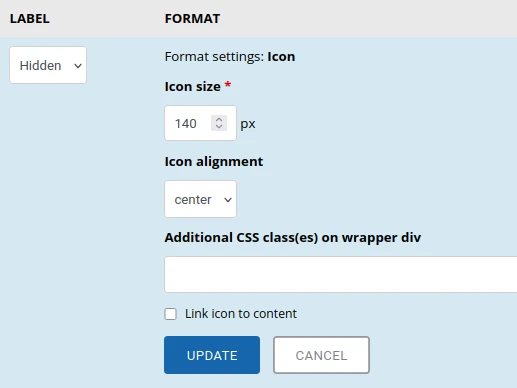
The browser dialog has two settings:
- If there are multiple icon providers, you can limit the dialog to allow
either "core" or "modules" - How many icons per page the dialog should show (default: 80)
Note that the form item in the dialog to select the icon provider is hidden, if
there's only one provider (core).
Also note that those browser dialog settings are global, not per field
instance.
Core ships with a full icon set (Phosphor Icons). Additional provider can be any
module that implements hook_icon_info().
Currently there's only one module in contrib: Font Awesome
Requirements
At least Backdrop CMS core 1.34.1.
Installation
Install this module using the
official Backdrop CMS instructions.
Go to admin/structure/types/manage/YOUR_NODE_TYPE and add an Icon field
type. Adapt settings as needed and also adapt display.
Issues
Bugs and feature requests should be reported in the
Issue Queue.
Current maintainers
License
This project is GPL v2 software. See the LICENSE.txt file in this directory for complete text.