Recommended releases
| Download | Released | |
|---|---|---|
| 1.x-1.0.0-beta002 (72.33 KB) | Nov 27th, 2026 | Notes |
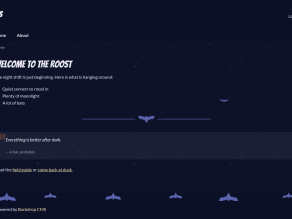
Bats is a novelty theme for Backdrop CMS: lots of bats, a dark night-sky look, and a bit of comic-book drama. It is a subtheme of Opera, so it keeps Opera's layouts, accessibility work and customization options, and only changes the look.
All of the bats are original drawings. Bats is not affiliated with, and does not use any logo, name or typeface from, any comic or film character.

Status
Early development. Feedback and bug reports are welcome.
What you get
- A dark night-sky palette ("Midnight Cave"): deep blues and violets, moonlight text and ember-orange buttons, with strong contrast between text and background.
- Bangers headings (a comic-book display font from Google Fonts) with Lato for body text.
- Bats everywhere:
- bats hanging upside down along the top of the footer
- bat bullets in body-text lists, and a bat in the middle of horizontal rules
- a bat icon in the message boxes (status, warning, error, info)
- small bat icons before the "Comments", "Add comment" and "Search results" headings
- a bat-filled "page not found" page, and a maintenance page with bats flying across the moon
- Animated effects: two bats flying across the window, twinkling stars, a ring that spreads from links and buttons you point at, bats that peek over the top of cards, and a hidden surprise in the footer.
Requirements
- Backdrop CMS 1.x
- The Opera theme, 2.x branch, installed (it does not need to be enabled)
- Recommended: the Design Tokens module with its Color and Font sub-modules, to change Bats' colors and fonts from the admin UI. Bats needs a version of Design Tokens that lets subthemes use their base theme's token file; check the Design Tokens project page for the release that has it. Without the module, Bats still looks right, using the same colors from a static stylesheet.
Installation
- Install Opera and Bats in the usual way for Backdrop themes.
- Enable Bats and set it as the default theme.
- With Design Tokens enabled, go to Appearance > Design Tokens > Bats to change colors and fonts. Bats has its own saved values, separate from Opera's.
Settings
- Show animated bat effects (on the Bats settings page): turns the flying bats, stars, pings and peeking bats on or off for the whole site. On by default. The hanging bats, bullets, dividers and other still decorations always stay.
- Bat color (in Design Tokens): the color of every bat.
- Page background and text (in Design Tokens): the dark page colors that Opera does not have.
Turning the animation off
People can turn the animated effects off for themselves with the Bat effects switch at the top right of the header. The choice is kept in their browser. The effects are never shown to people whose device is set to reduce motion, and they are left out of printed pages.
Notes for Site Architects
- The bats are SVG files in
images/, colored through CSS masks, so they follow the Bat color token. - To add a bat icon before another heading, add its selector to the last group in
css/bats.css. css/bats-variables.cssholds Bats' default values. The browser uses it when Design Tokens is not enabled, and Design Tokens reads its defaults from it when it is.
Issues
Bugs and feature requests should be reported in the issue queue.
Current maintainers
Credits
- Created for Backdrop CMS by Tim Erickson.
- Built on the Opera theme.
- Development supported by Simplo (by Triplo) - https://simplo.site
License
This project is GPL v2 software. See the LICENSE.txt file in this directory for complete text.